CoWork Enterprise · APIFunnel · No download required
research preview

Go from task to done.
No desktop app required.

Leap the gap from chatting to doing. Describe the outcome — CoWork Enterprise takes action across every API your team uses, in a browser tab, with delegated auth your IT team actually controls.

One execution layer. One MCP server. IT-controlled delegated OAuth. Built for enterprise teams from day one — not a chat product with compliance bolted on after. Works across REST APIs, GraphQL APIs, MCP-backed APIs, and schemaless systems.

$29/mo · 14-day free trial · No card required to start

Get shit done

Task-focused execution. Chat intelligence meets execution.

Step 01

Share what you want to achieve

Start with your objective and available tools. CoWork Enterprise turns your task into an execution plan and runs it across connected systems.
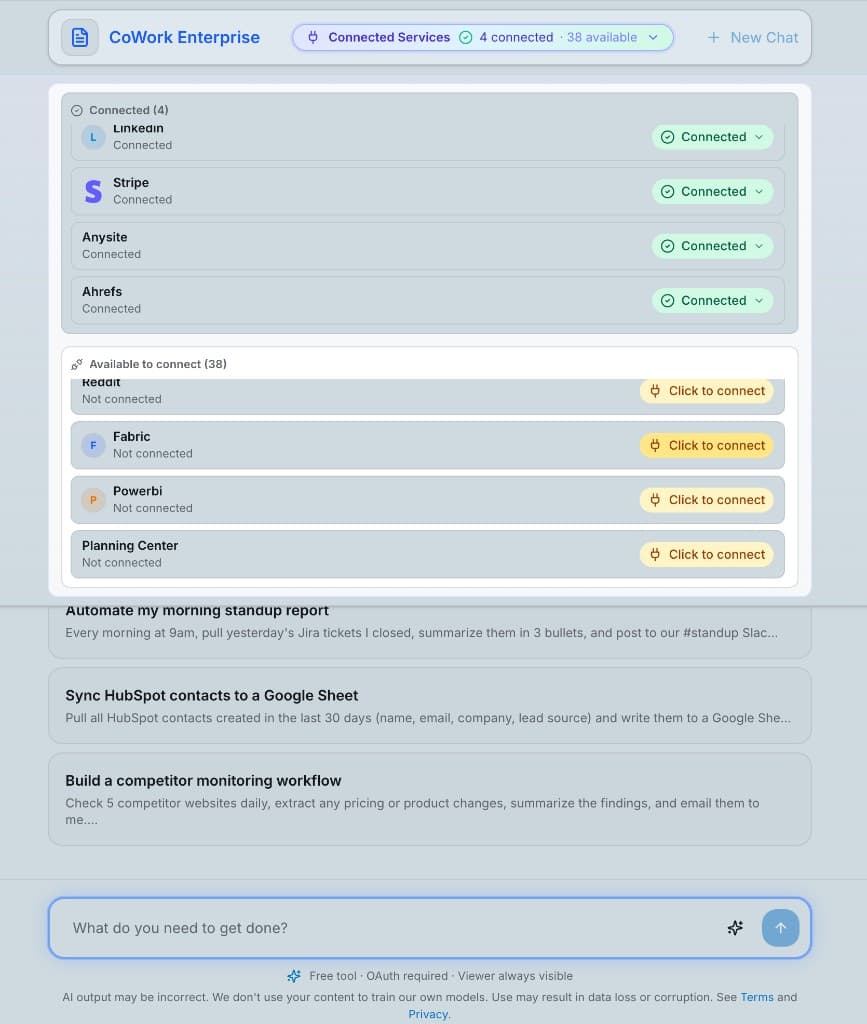
CoWork Enterprise connected services and task execution interface

Progress

Live run

Create folder structure (Scans, Receipts, Videos)

2

Move scan files

3

Copy and rename receipts

4

Move video to Videos folder

Working folder

Receipts / 2025-10

Step 02

CoWork figures it out and executes

Execution runs step-by-step with visible progress. You see what happened, what completed, and the final result from the last run.

CoWork Enterprise connected services and task execution interface

Progress

Live run

Create folder structure (Scans, Receipts, Videos)

2

Move scan files

3

Copy and rename receipts

4

Move video to Videos folder

Working folder

Receipts / 2025-10

Wire your entire stack together.

Connect the systems your org already uses, then execute workflows across them in one run. REST, GraphQL, MCP-backed APIs, and schemaless systems can all work together in the same task.

Sprint Wrap-Up Workflow

Product Management · Persisted skill + scheduled run

Persisted skill (code)

export const sprintWrapUp = skill({
  schedule: "0 16 * * FRI",
  run: async ({ apis }) => {
    const sprint = await apis.linear.getCompletedIssues("PLT-24")
    await apis.notion.updateRetro("platform-retro", sprint)
    await apis.linear.moveSlippedIssues("PLT-24", "PLT-25")
    return apis.slack.post("#product", buildSprintSummary(sprint))
  },
})

Result — last run

Linear API

Sprint PLT-24 fetched · 18 issues completed, 3 slipped

Notion API

Retro doc updated · "Shipped" section filled (18 items)

Linear API

3 slipped issues moved → PLT-25 backlog (IDs: 4401–4403)

Slack API

Posted to #product · 18 shipped · 14% slip · Highlight: Auth v2 shipped

Task completed in 23s · Logged to audit trail · Next run: Fri 4:00pm
Systems used:Linear APINotion APISlack APICalendar Trigger

Engineering Lead

GitHub APIJira APIPagerDuty API

On every deploy to prod: create a Jira release ticket, tag affected issues as deployed, and silence PagerDuty for 10 minutes while smoke tests run.

Finance Analyst

Stripe APIQuickBooks APISlack API

Every Monday: reconcile weekend Stripe revenue against QuickBooks, flag discrepancies over $250, post a clean summary table to #finance-ops.

Sales Ops

HubSpot APIApollo APIGmail API

When a HubSpot deal moves to 'Proposal Sent': enrich the contact in Apollo, then schedule a follow-up email for +3 days if no reply detected.

Customer Success

Intercom APINotion APISlack API

Weekly: pull Intercom support trends, update the 'Known Issues' Notion page, and post a digest of top 5 complaints to #cs-team.

Legal & Compliance

Google Drive APINotion APIGmail API

Scan contracts folder for NDAs expiring in 30 days, summarize key terms in Notion, and email the legal lead with a renewal checklist.

Your team

REST APIsGraphQL APIsSchemaless sources

Connect any tool your org uses — Salesforce, Snowflake, ServiceNow, internal APIs, and more. One execution layer, across every system.

Start building your workflow

CoWork Enterprise executes across APIs and systems your team already uses, without forcing one integration pattern.

How it works

Two steps. No downloads. Works in the browser tab you have open right now.

01

Connect your stack

Add your credentials and integrations from the dashboard. REST APIs, GraphQL APIs, MCP-backed APIs, and schemaless systems all work in one execution layer.

02

Get shit done

Execute tasks instantly or as persisted skills. The system handles orchestration and runs the work across your connected stack.

Enterprise ready

Built for every team, not just engineers. CoWork Enterprise lets you configure kits across every function in the org for specialized workflows.

Finance
  • Reconcile Stripe payouts against QuickBooks automatically
  • Generate weekly P&L reports from your database
  • Flag invoice anomalies and open tickets before month close
Sales & GTM
  • Re-engage cold HubSpot deals with personalized drafts
  • Synthesize call transcripts into product feedback
  • Automate follow-up sequences based on deal stage
Engineering
  • Post weekly PR standup digests to Slack automatically
  • Triage GitHub issues by priority and assign owners
  • Generate release notes from commit history
Operations
  • Produce the weekly ops report from 5 data sources
  • Monitor system health and escalate via PagerDuty
  • Onboard new hires: provision accounts, send docs, schedule intros
Legal & Compliance
  • Triage NDAs and flag non-standard clauses
  • Organize contract folders with consistent naming
  • Track renewal dates and send reminders before they lapse
Marketing
  • Pull campaign performance data into a formatted deck
  • Draft weekly newsletter from blog posts and announcements
  • Monitor brand mentions and surface trends

Comparison snapshot

For IT, security, and ops teams evaluating execution platforms — not just another chat tool.

CoWork Enterprise
Claude Cowork

Runs in browser — zero install

Delegated OAuth — IT-controlled API access

Unified MCP server — no per-user config files

Partial

Audit logs & full data export support

Code execution as the control plane

Persistent state across sessions

Reliable scheduled automation

Suitable for regulated workloads

Bring your own API keys (BYOK)

Model flexibility (GPT-4o, Gemini, etc.)

In-browser code execution

Team admin controls (SSO, roles, policies)

Partial

Sources: claude.com/product/cowork (Cowork FAQ & Enterprise notes) · The Product Compass: Claude Cowork Guide

Built so your IT team can sleep at night

Enterprise-grade guardrails from day one — not bolted on as an afterthought.

Audit logs that actually work

Every action is logged for compliance and operational review.

Delegated auth — IT holds the keys

IT provisions credentials at the org level. Users operate within the scopes IT grants. When someone leaves, IT revokes centrally. No rogue OAuth connections flying under the radar.

Approve before it acts

For significant operations, CoWork Enterprise shows you the plan and waits. You can redirect, refine, or cancel at any step.

SSO & team management

On the Enterprise plan: Single sign-on, role-based access, and centralized admin controls — not just an on/off toggle.

Your data stays yours

Credentials are encrypted and stored in your account. We never train on your task data or share it with third parties.

No local files exposed

Browser-based means no access to your filesystem unless you explicitly upload. No isolated VM gymnastics. Simpler security model.

FAQ

What's the difference between CoWork Enterprise and regular task tools?

Regular task tools respond to your messages. CoWork Enterprise has access to every API you've connected and can take real action — send emails, open tickets, reconcile data, trigger workflows — not just describe how to do it.

How does IT maintain control over what the AI can access?

CoWork Enterprise uses delegated OAuth — IT provisions service credentials at the org level and defines the permission scope. Individual users operate within those boundaries. When someone leaves, IT revokes centrally. No individual OAuth connections created outside IT's visibility, no 'who authorized this' questions after the fact.

We already have engineers running their own MCP servers. How is this different?

Local MCP configs are per-user, undocumented, and invisible to IT. CoWork Enterprise runs a single unified MCP server that covers your entire SaaS stack — one authorization model, one audit trail, one thing to govern. You replace a Frankenstein mix of configs with one controlled execution layer.

Do I need to download anything?

No. CoWork Enterprise runs entirely in your browser. No desktop app, no terminal, no IT ticket. Open apifunnel.ai and start a task.

How is this different from chat assistants?

Chat assistants mostly explain what to do. CoWork Enterprise executes tasks across connected systems and returns completed outcomes with logs.

What APIs can I connect?

REST APIs, GraphQL APIs, MCP-backed APIs, and schemaless systems. Stripe, GitHub, Slack, Gmail, HubSpot, QuickBooks, Salesforce, Jira, Intercom, and internal APIs are common examples.

Can I schedule tasks to run automatically?

Yes. Any task can be turned into a Skill and scheduled with cron syntax. State persists across runs, retries are automatic, and you get notified on completion or failure.

Does CoWork Enterprise remember context between sessions?

Yes. Skills have native persistent state so variables, results, and context can carry across runs.

How reliable is the scheduling?

Skills run on our infrastructure on the schedule you define, with automatic retries and failure notifications.

Is CoWork Enterprise suitable for regulated industries?

Enterprise plan customers can discuss compliance requirements directly with our team.

What's included in the 14-day trial?

Full access to CoWork Enterprise and the entire APIFunnel platform. No credit card required to start. Cancel anytime.

Ready to complete tasks, not conversations?

Start with a 14-day free trial. Connect your first API, describe your first task, and see what an agent that actually acts can do for your team.

Already have an account? Sign in